

Table of Contents
Introduction to Hardware and Networking Troubleshooting
Hardware and Networking Troubleshooting is a disciplined and structured practice built on strong fundamentals rather than guesswork. Hardware and networking form the backbone of every IT environment, and when systems fail, problems usually appear first at these layers. Professionals who master hardware and networking troubleshooting often begin by strengthening their fundamentals through a hardware and networking course.
In complex infrastructures, issues rarely reveal their root cause directly. A network failure may look like an application problem, while failing storage hardware can mimic software crashes. Strong hardware and networking troubleshooting knowledge removes this confusion and accelerates resolution.
Why Hardware and Networking Troubleshooting Speeds Up Problem Resolution
A clear understanding of hardware and networking troubleshooting transforms issue resolution into a logical elimination process. Symptoms are mapped to probable causes, assumptions are verified quickly, and root problems are identified earlier. This approach strengthens real-world hardware and networking skills.
Faster troubleshooting reduces downtime and operational stress. In professional IT environments, efficient hardware & networking troubleshooting directly improves system reliability and professional credibility.
The Impact of Slow Hardware and Networking Troubleshooting
Delayed hardware and networking troubleshooting leads to increased downtime, loss of productivity, and damaged user trust. In modern IT infrastructures, a single unresolved hardware or network issue can trigger cascading failures. Formal training through a hardware and networking course helps professionals resolve incidents quickly before they escalate.
Foundations of Effective Hardware & Networking Troubleshooting
The Troubleshooting Mindset
Effective hardware & networking troubleshooting starts with discipline. Observation comes before action. Problems are isolated, hypotheses are tested one at a time, and solutions are validated properly. This prevents temporary fixes that hide symptoms without resolving root causes.
Common Mistakes That Delay Troubleshooting
Frequent errors include skipping basic hardware checks, rebooting systems without analysis, ignoring system logs, and making multiple changes simultaneously. Another major issue is tunnel vision. Successful hardware and networking troubleshooting requires examining hardware, network, and operating system layers together.
Essential Hardware Knowledge for Troubleshooting
Core Hardware Components and Failure Patterns
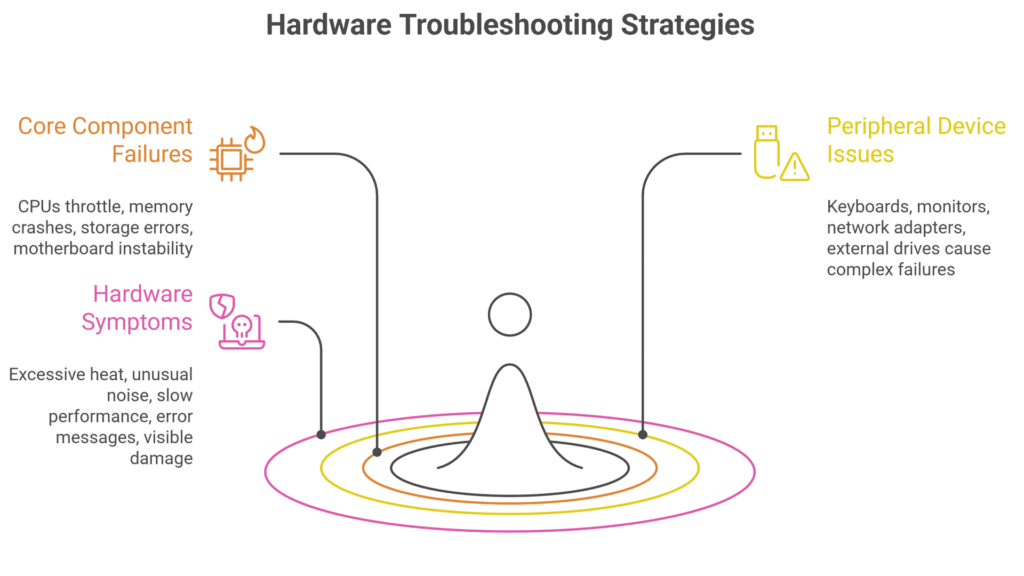
Internal components fail in predictable ways. CPUs throttle during overheating, memory failures cause intermittent crashes, storage devices show read/write errors, and motherboards experience power instability. Recognizing these patterns improves hardware troubleshooting speed.
Peripheral Hardware Issues
Peripheral devices such as keyboards, monitors, network adapters, and external drives can cause failures that appear complex. In hardware & networking troubleshooting, isolation and replacement testing are often the fastest solutions.
Hardware Symptoms and Root Causes
Common hardware symptoms include excessive heat, unusual noise, slow performance, error messages, and visible damage. These signals narrow down troubleshooting efforts quickly.
Networking Fundamentals for Hardware and Networking Troubleshooting
How Data Moves Across Networks
Data travels in packets that are addressed, routed, transmitted, and acknowledged. Latency, bandwidth, and packet loss directly affect performance. Understanding packet flow aligns closely with the OSI model explained in detail by Cisco networking documentation.
Network Types and Common Issues
LAN networks face cabling and switch configuration problems. WAN networks introduce latency and ISP dependency. Wireless networks suffer from interference and coverage limitations. Hybrid networks combine all these challenges, making hardware & networking troubleshooting critical.
Network Topology and Troubleshooting Impact
Network topology influences fault isolation. Star topologies simplify troubleshooting, while flat or mesh networks increase complexity. Proper segmentation improves network troubleshooting efficiency.
Networking Devices and Failure Scenarios
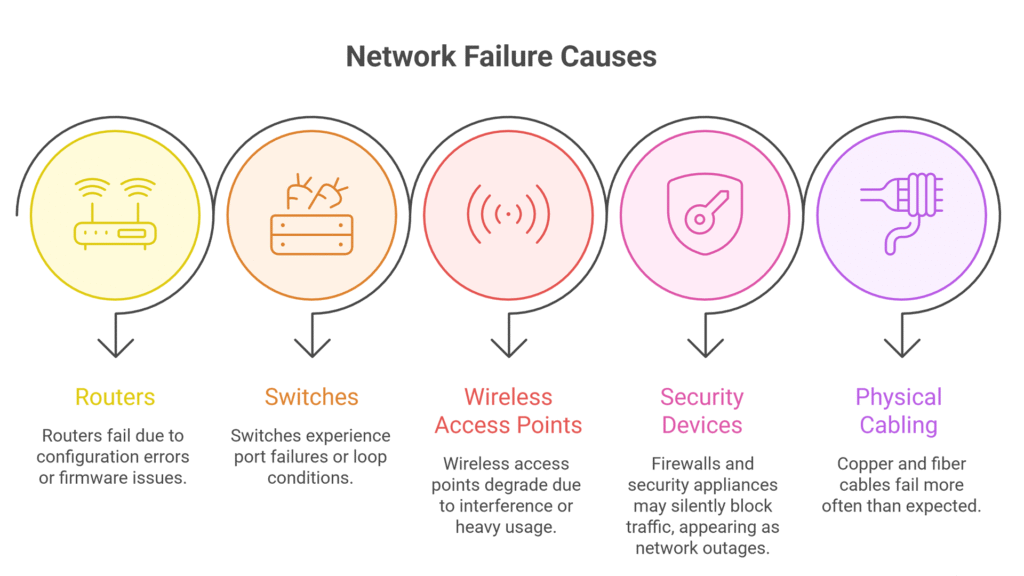
Routers fail due to configuration errors or firmware issues. Switches experience port failures or loop conditions. Wireless access points degrade due to interference or heavy usage. Distinguishing between configuration issues and hardware failures is essential in hardware & networking troubleshooting.
Security Devices in Troubleshooting
Firewalls and security appliances may silently block traffic, appearing as network outages. Hardware & networking troubleshooting must include security log analysis to confirm policy-based issues.
Physical Cabling and Infrastructure Issues
Copper and fiber cables fail more often than expected. Damaged connectors, improper termination, and bent fiber cause intermittent connectivity problems. Physical inspection remains a key step in hardware and networking troubleshooting.
Protocol and Configuration Errors
Protocols behave predictably during failure. TCP retransmissions, DNS timeouts, DHCP failures, and routing issues provide valuable clues. Avoiding configuration mistakes such as duplicate IP addresses, incorrect gateways, and overlapping subnets improves network stability.
Operating Systems and System Diagnostics
Operating systems provide valuable insights through logs and alerts. Ignoring these signals slows hardware and networking troubleshooting. Driver conflicts, firmware mismatches, and compatibility issues commonly appear after updates.
Practical Tools for Hardware and Networking Troubleshooting
Tools such as ping, traceroute, ipconfig, and netstat help diagnose connectivity and configuration issues. Hardware diagnostic utilities detect memory faults, disk errors, and thermal issues, extending visibility beyond surface symptoms.
Building a Repeatable Hardware and Networking Troubleshooting Workflow
Structured approaches such as bottom-up troubleshooting or OSI layer models ensure consistency. Documentation converts individual experience into organizational knowledge and supports long-term growth, often strengthened through a hardware and networking certification.
Preventive Practices to Reduce Troubleshooting Incidents
Proactive maintenance, monitoring, timely updates, and lifecycle planning reduce unexpected failures. Network baselining helps detect anomalies early and simplifies future hardware & networking troubleshooting.
Conclusion: Mastering Hardware and Networking Troubleshooting
Strong fundamentals in hardware & networking troubleshooting turn system symptoms into clear diagnostic signals. Troubleshooting becomes faster, more accurate, and reliable. As skills improve, confidence and career opportunities grow. Continuous learning through platforms such as Vnet Academy ensures hardware and networking troubleshooting expertise remains relevant in evolving IT environments.Strong troubleshooting skills also improve eligibility for entry-level hardware and networking jobs in IT support and network operations.
What is hardware and networking troubleshooting?
Hardware & networking troubleshooting is the process of identifying, analyzing, and fixing issues related to computer hardware components and network connectivity using structured diagnostic methods.
Which tools are used for hardware & networking troubleshooting?
Tools such as ping, traceroute, ipconfig, netstat, system logs, and hardware diagnostic utilities are widely used for effective hardware and networking troubleshooting.
Why is hardware and networking troubleshooting important in IT?
Hardware & networking troubleshooting helps reduce system downtime, improve performance, and prevent recurring failures. Strong troubleshooting skills allow IT professionals to resolve issues faster and maintain reliable systems.